02
Solving the match quality problem
Good matches start with understanding what an ideal candidate looks like. That sounds simple. It isn't. Our research revealed 3 root causes of poor match quality:
Structured taxonomy limitations: The backend couldn't handle nuanced requirements. "A master's degree could compensate for less work experience" expresses a trade-off that boolean filters can't capture.
Employers can't see market reality: Employers set requirements without visibility into the talent market. They only learn their criteria are unrealistic after weeks of empty results, then scramble to adjust.
Employers hedge by going broad: Employers cast wide nets, which diluted match quality.
These three problems reinforced each other. And they pointed to the same underlying question that would shape every design decision in this section: how does the system understand what the employer actually wants, and how does it prove that it understood?
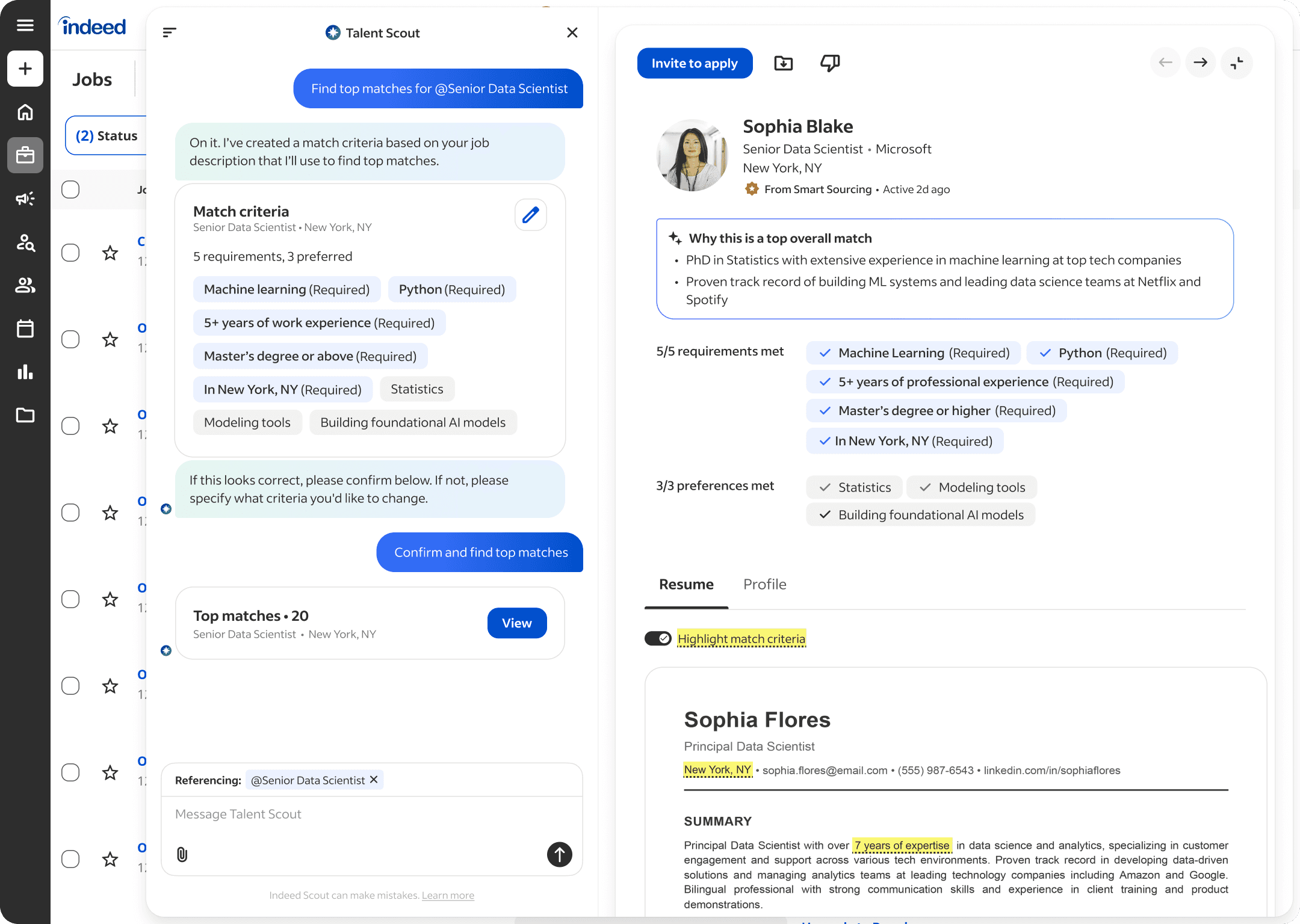
I worked through that question in three stages. First, when and how we capture employer intent. Then, how we represent that intent back to them. And finally, how we prove the system used it correctly.
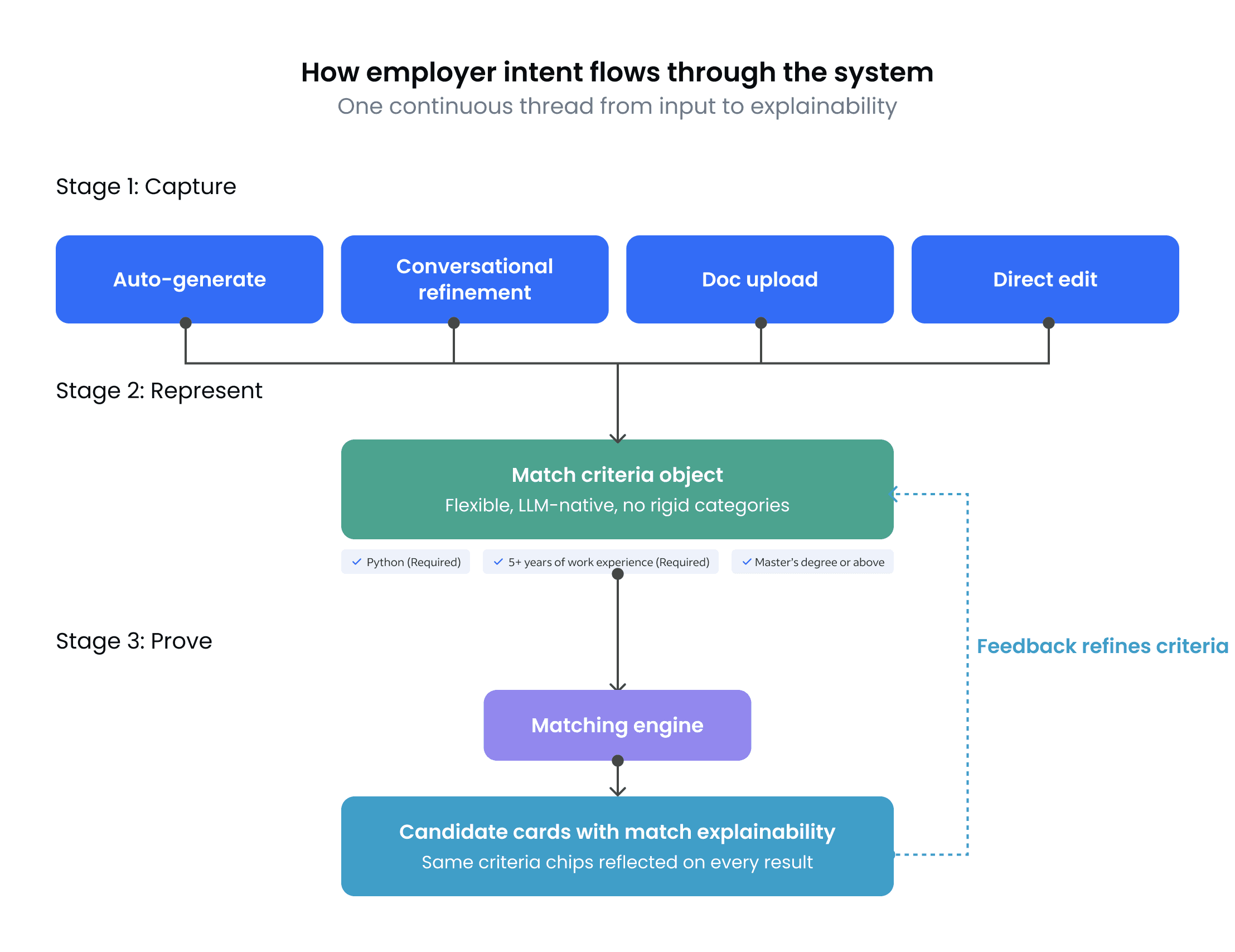
The feedback loop on the right is the key insight. This isn't a linear pipeline. Every time an employer interacts with a candidate card, that feedback flows back into their criteria, making the next round of matches smarter. The whole system is designed to compound.
Let me walk through each stage.
Stage 1: Capturing intent
Hypothesis
If we calibrate the ideal candidate profile upfront using natural language, we'll get fundamentally better matches.
I initially designed a 3-step calibration flow to address the root causes: define job requirements, review example candidates with thumbs-up/thumbs-down feedback, then rank importance.
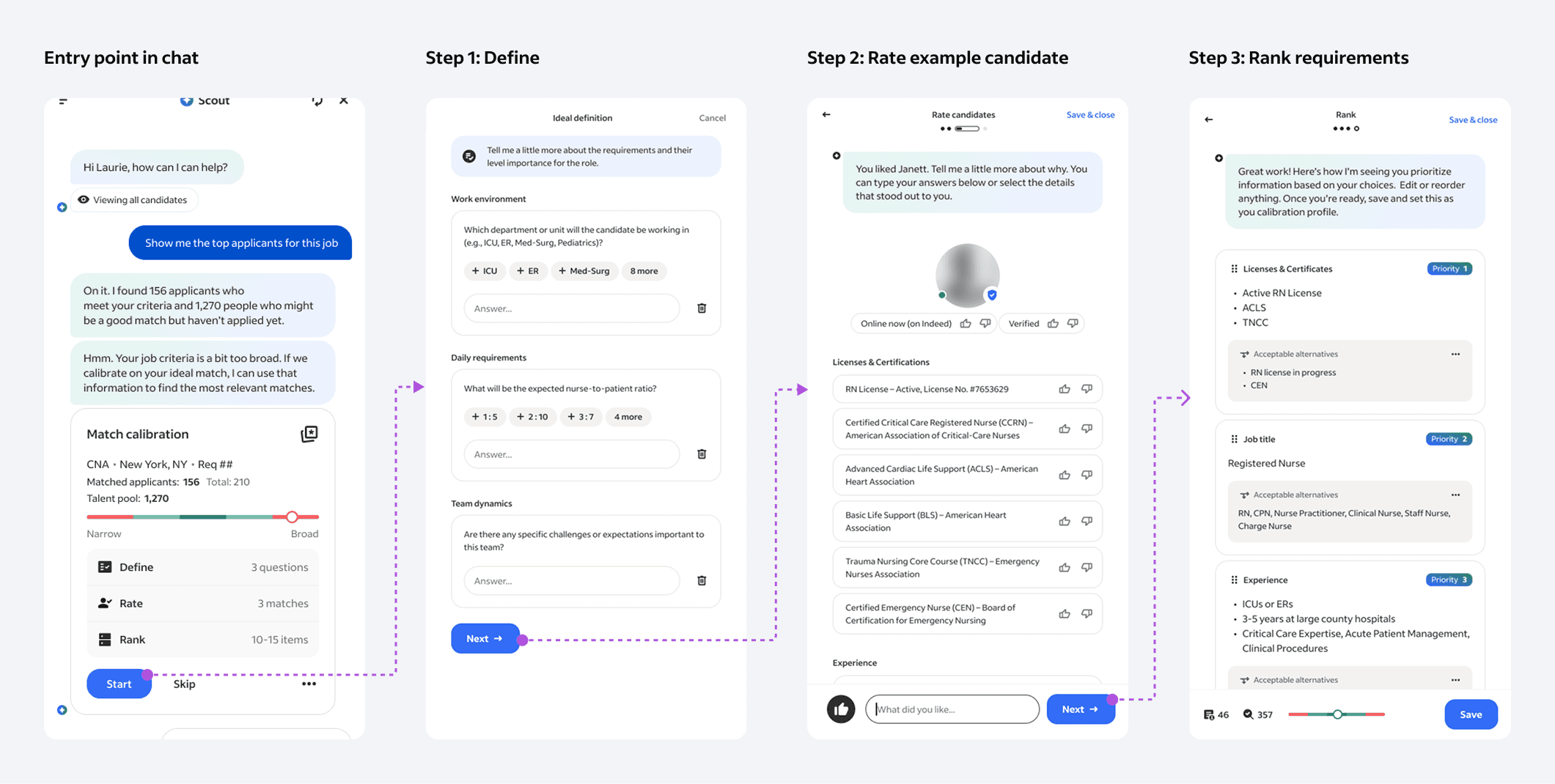
The logic was sound. Good matches need good inputs. But the data told a different story. Six of eight employers complained during testing. The abandonment rate hit 75%. What we learned explained why:
Instant gratification expectation: Employers expect instant gratification when they see a prompt such as “show me the top candidates” rather than taking the time up front to set up a calibration
Effort-expectation escalation:
Fine-grained feedback on attributes was overwhelming: “Click fatigue” for rating candidate details 👍/👎 slows users down and risks abandoning the workflow
Employers want to evaluate real candidates, not samples. They'd rather provide continuous feedback on actual matches they can save and contact rather than going through a staged calibration disconnected from their real workflow.
Every setup step raised the bar. The more effort employers invested upfront, the higher their expectations for match quality, creating an impossible standard to clear.
The "ideal candidate profile" is a moving target: Employers constantly adjust their ideal candidate based on talent pool reality. There's no point perfecting requirements upfront if the candidates they're describing don't exist.
The pivot I drove
In a design review, I made the case to our Product Director and Engineering lead that we needed to abandon calibration entirely. The argument: 75% abandonment with a polished flow is objectively worse than 70% initial accuracy with sustained engagement. The question wasn't "how do we improve the calibration flow." It was "should calibration exist at all?"
The resistance was real. Product had invested in the calibration concept. Engineering had already scoped the implementation. Proposing we throw it out and start with lower accuracy felt like lowering the bar. I reframed it: we weren't accepting worse quality. We were choosing a model where quality compounds over time instead of betting everything on a single upfront interaction that most employers would never finish.
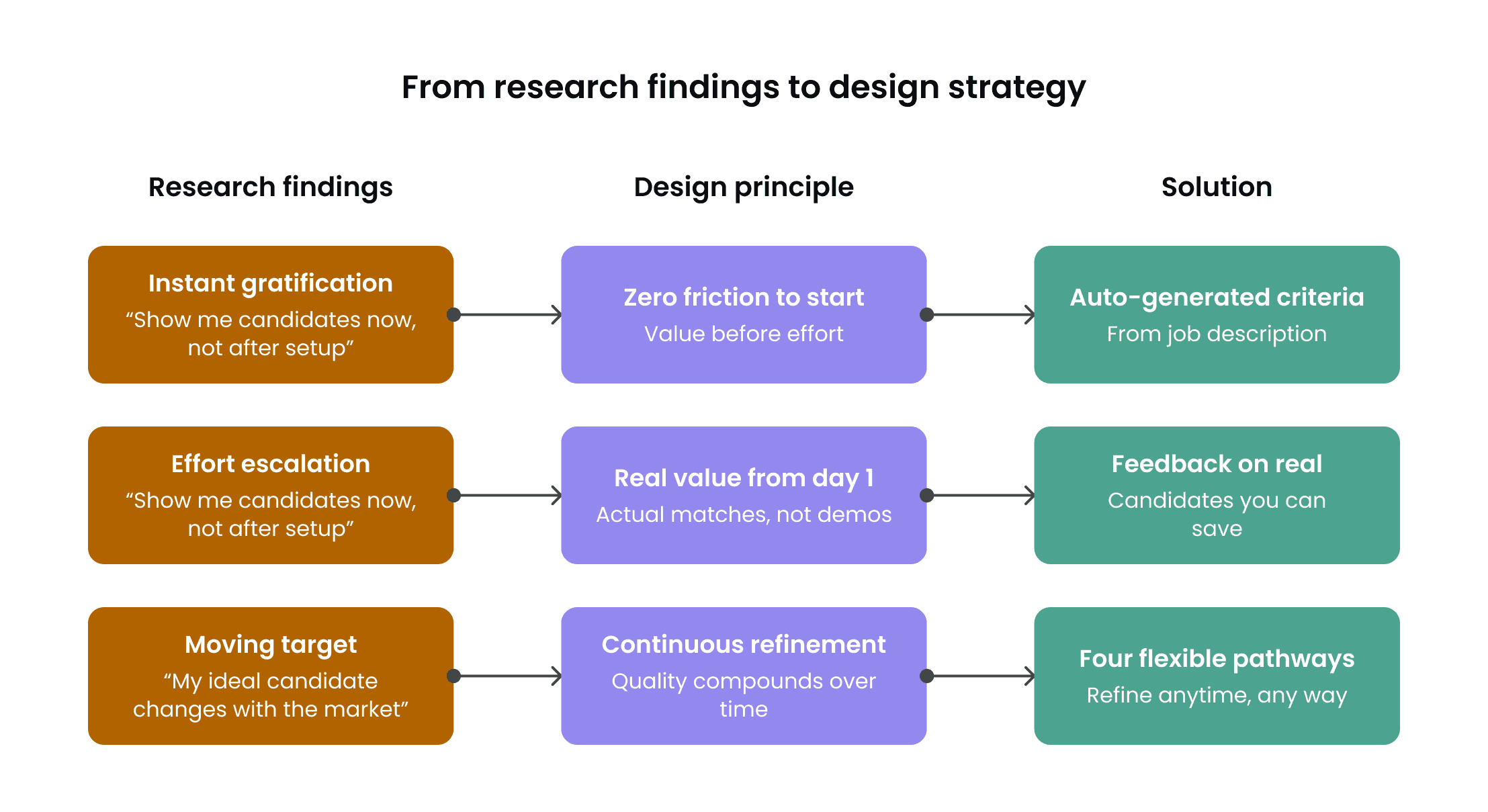
Updated design: Four Pathways to Understand Hiring Intent
Rather than one rigid flow, I designed four flexible entry points that meet employers where they are:
Auto-generated: Scout generates initial criteria from the job description. No setup required. Employers see matches immediately.
Conversational refinement: Employers describe requirements in natural language. Scout asks focused follow-ups based on what's genuinely missing, updates criteria in real time, and shows what changed. A recruiter hiring a nurse might type "I need ICU experience" and Scout responds: "You mentioned 1 year of ICU experience is required. What patient-to-nurse ratios are typical for this unit?"
Document upload: Scout extracts requirements from intake docs or reference resumes and asks for confirmation, capturing nuanced intent that wouldn't surface through chat alone.
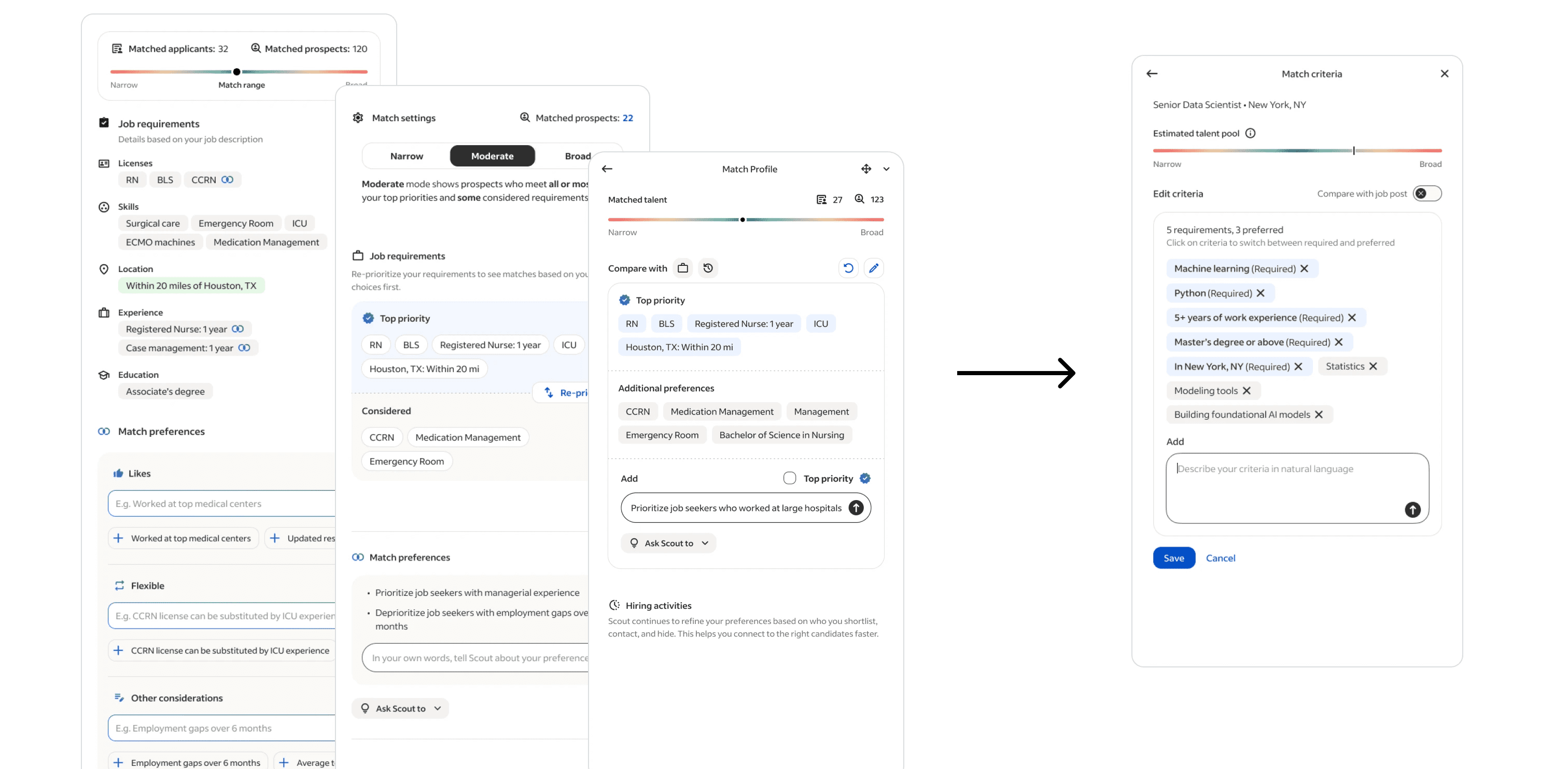
Direct editing: An edit button opens a criteria editor with a match meter showing whether criteria are too narrow or broad, giving employers tangible control over the algorithm.
Auto-generated
Conversational refinement
Doc upload & direct editing

Auto-generated: Scout generates initial criteria from the job description. No setup required. Employers see matches immediately.
Stage 2: Representing intent
Stage 3: Proving intent
The outcome
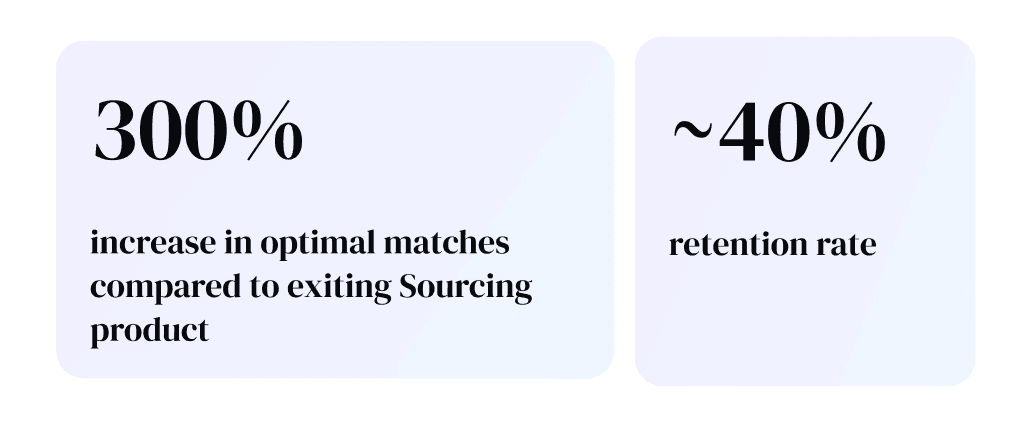

It’s so easy and user friendly. It only takes me 5 seconds or so to type one sentence prompt and then Talent Scout generates 30-plus candidates almost immediately. The amount of criteria I was able to adjust was quite surprising.”
03
Earning the right to recommend
Indeed had a dashboard full of job performance data. Charts, graphs, trend lines. It showed the "what" without the "why" or "how." Dense visualizations served organizational leaders running reports, not individual recruiters trying to improve a specific job posting that wasn't getting qualified applicants.
And the workflow made it worse: navigate to a separate dashboard, filter to one requisition, interpret the data, context-switch back to the job, then figure out what to change. The insight and the action were completely disconnected.
On top of that, employers were skeptical of AI recommendations they couldn't verify. As one recruiter put it: "I think it's really loose, the basis for the data. I don't know how legitimate it is."
So the challenge wasn't surfacing more data. It was earning the right to recommend.
The design approach: Diagnose before you prescribe
Low satisfaction for high-stakes AI tasks meant we couldn't lead with recommendations. Telling an employer "change your job title" before they trust your data is like a doctor prescribing medication before explaining the diagnosis. I designed a progressive disclosure flow that mirrors how trust actually gets built:
WHAT / Surface familiar job performance metrics without jargon. Numbers alone don't tell the full story, but they establish that Scout is looking at real data.
WHY / Provide competitive market context employers can't access on their own. "Your job title gets 40% fewer clicks than similar roles in your market." This transparency directly addresses skepticism by showing Scout's reasoning.
HOW / Deliver ranked, actionable recommendations with estimated impact, so employers know where to focus first and can weigh the effort against the payoff.
WHAT
WHY
HOW
WHAT: Surface familiar job performance metrics without jargon
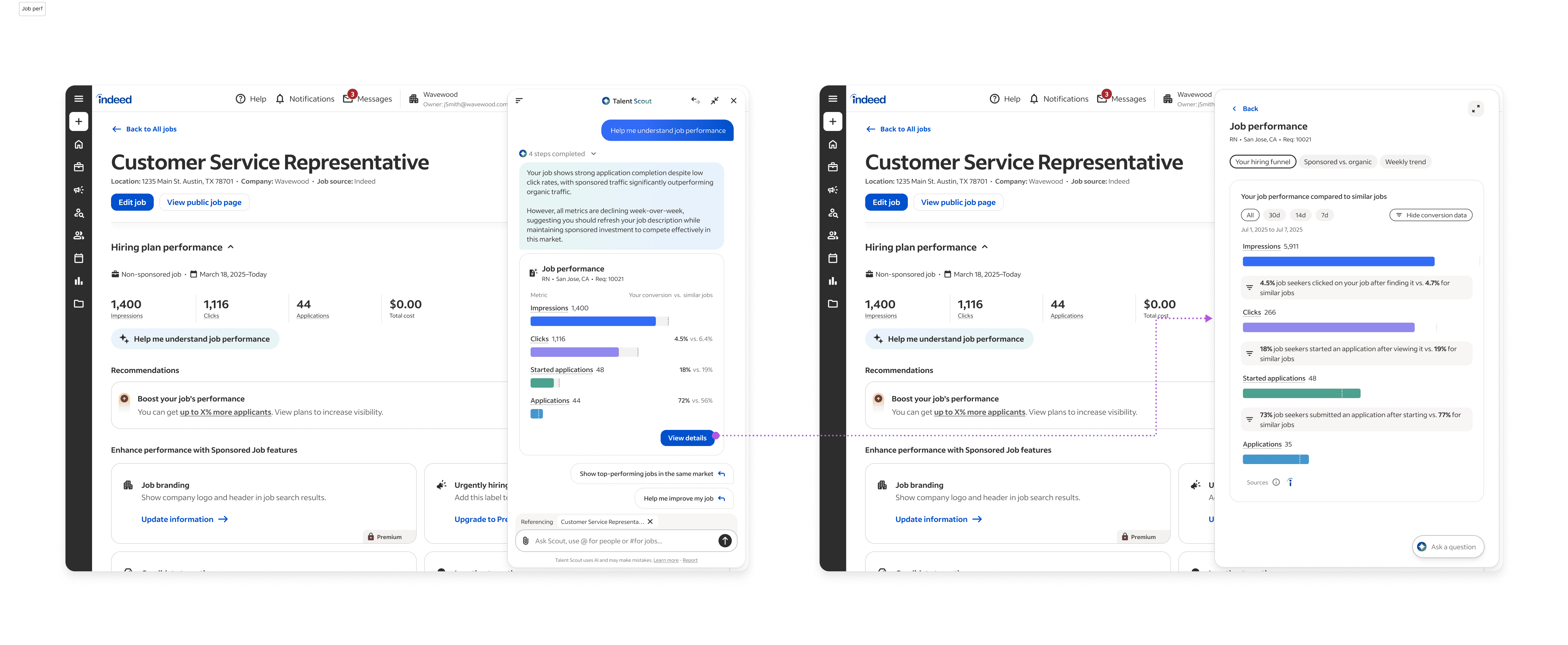
Each stage surfaces a suggested prompt to guide employers to the next step, so the progression feels like a natural conversation rather than a forced funnel. And because Scout is an overlay that lives wherever recruiters work, this entire narrative unfolds in context, right next to the job they're looking at. No dashboard navigation. No context-switching.
This staged approach prevented overwhelm while transforming suggestions from arbitrary to evidence-based. And critically, recruiters told us these insights doubled as advocacy tools they could bring to hiring managers, which aligned directly with the research finding that recruiters need internal influence, not just personal productivity.
Using Talent Scout to optimize our job descriptions has really helped us see if our expectations for certain areas are realistic.
04
Where We are headed After Launch
We launched Talent Scout to over a million employer accounts in one year. Engagement was strong: 57% of employers who opened Scout used it meaningfully. Early enterprise customers were enthusiastic. One recruitment specialist doubled their hiring efficiency. A clinical recruiter made 10 hires while saving 8 hours a week.
But the retention data told a more complicated story.
Enterprise employers retained at 30%. SMB dropped to 7%. Paid users actually retained worse than free users (8.8% vs 17.5%). Churned users encountered the deep sourcing paywall 321% more often than retained users. And the most striking number: 90-95% of employers never opened the chat at all.
The paywall was clearly driving churn, but even setting that aside, most employers weren't engaging with the interface at all. I kept coming back to the same question: were we looking at a collection of feature problems, or was something more structural going on?
I organized a cross-functional brainstorm with UX, Product, and Engineering to map what we were seeing. I didn't want to take the data offline and come back with a design solution. The signals were too interconnected for one discipline to unpack alone.
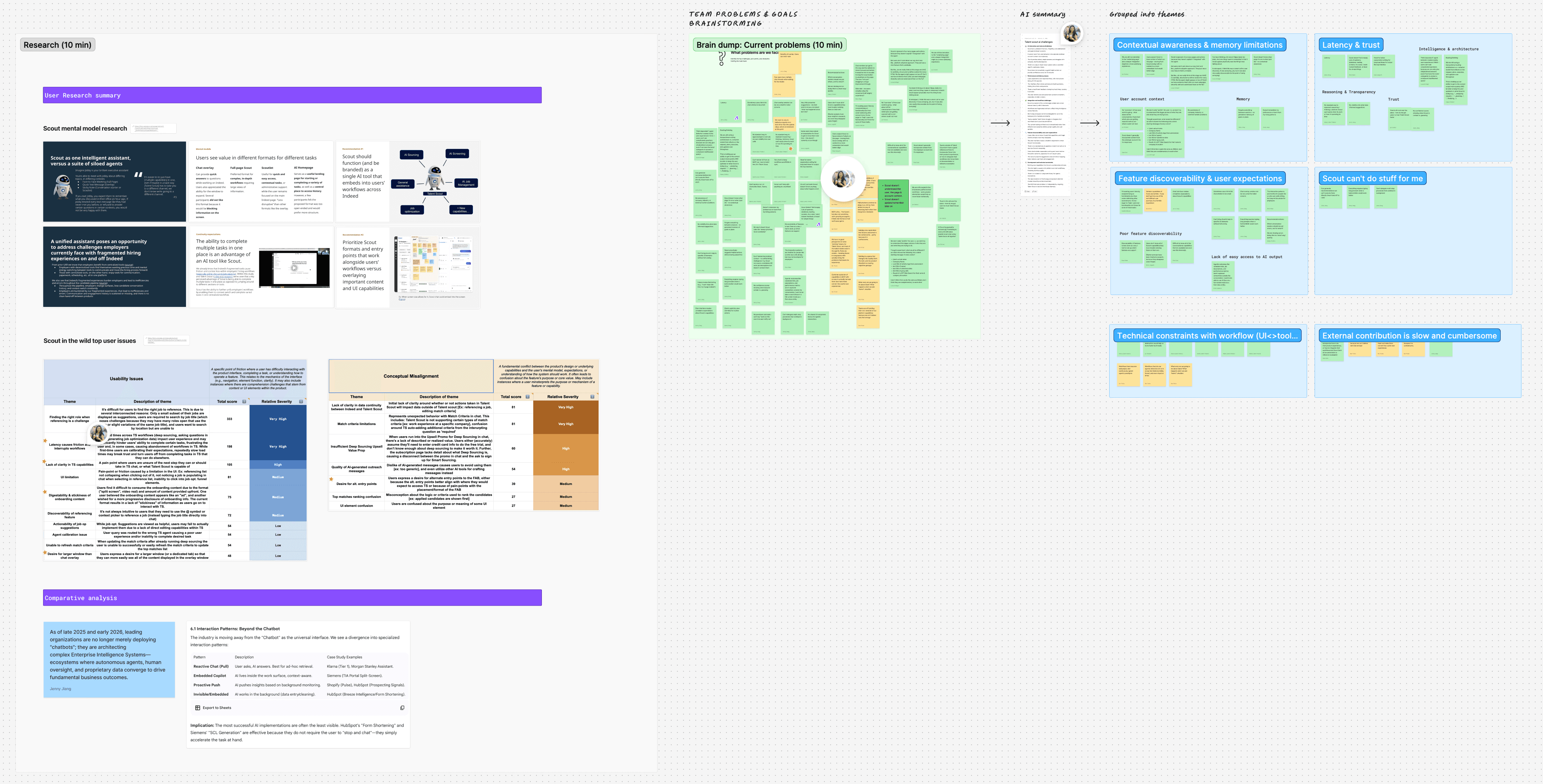
Problem space brainstorm
Solution space brainstorm
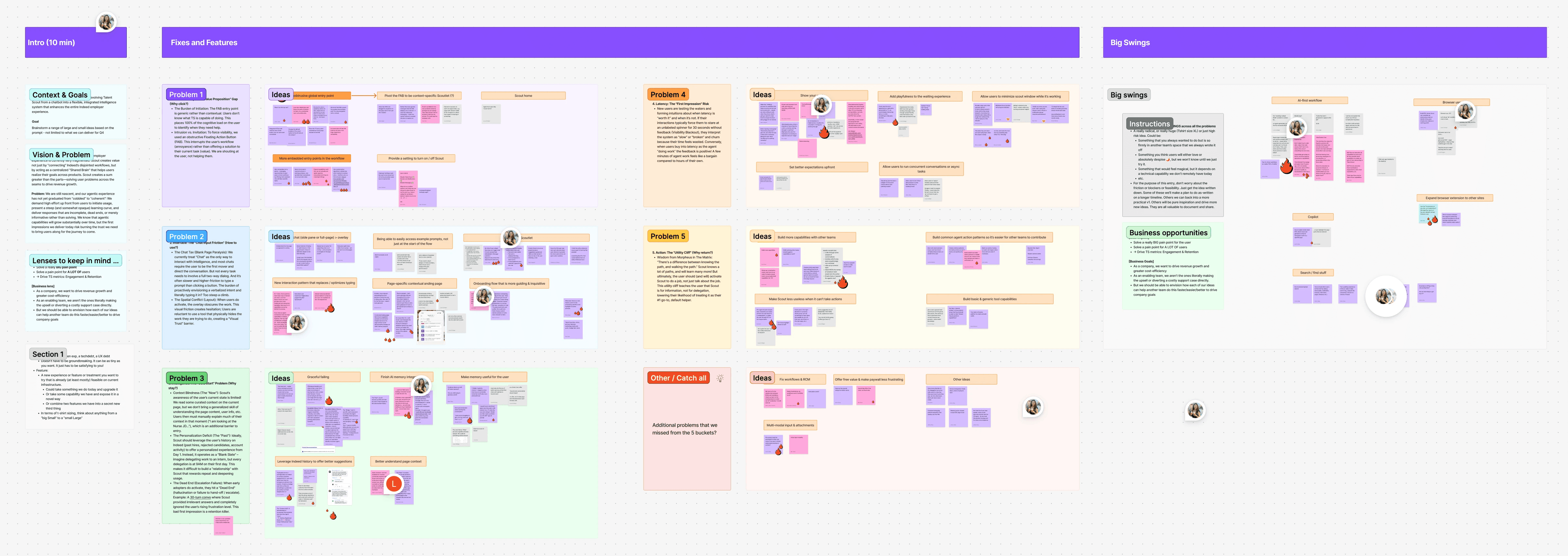
What came out of that session was a prioritized problem landscape showing how five themes reinforced each other:
Discoverability. The floating action button was generic rather than contextual. Users had no idea what Scout could do. We were placing 100% of the cognitive load on the employer to figure out when they needed help, and they just... didn't. One participant in our retention research said she had it pop up, tried it briefly, and closed it because she had resumes to review and didn't have time to explore a tool with no clear value proposition.
Chat input friction. We were treating chat as the only way to interact with intelligence. But typing a prompt is slow. Recruiters are task-switching between their ATS, email, and Indeed all day. Stopping to formulate a natural language query, provide context the system should already have, and wait for a response felt like extra work, not a shortcut. One recruiter told us they wanted to "more quickly get to their in-the-moment goal." Another said they felt like they "had to know what to say to get the right answer," which is the opposite of what natural language is supposed to feel like.
Cold start. Scout didn't know enough about the employer's context. It didn't know what page they were on, what job they were looking at, or what they'd done on Indeed before. Every conversation started from scratch. Users had to manually explain their situation before Scout could help, which just added to the friction.
Latency. First impressions were burning trust. Slow responses on the first interaction made employers less likely to come back.
The utility cliff. Even when Scout answered well, it informed but didn't act. Recruiters told us they wanted AI to do jobs, not just talk about them. Scout would explain what was wrong with a job posting but couldn't fix it. It could find candidates but couldn't draft outreach. It stopped short of the moment that mattered.
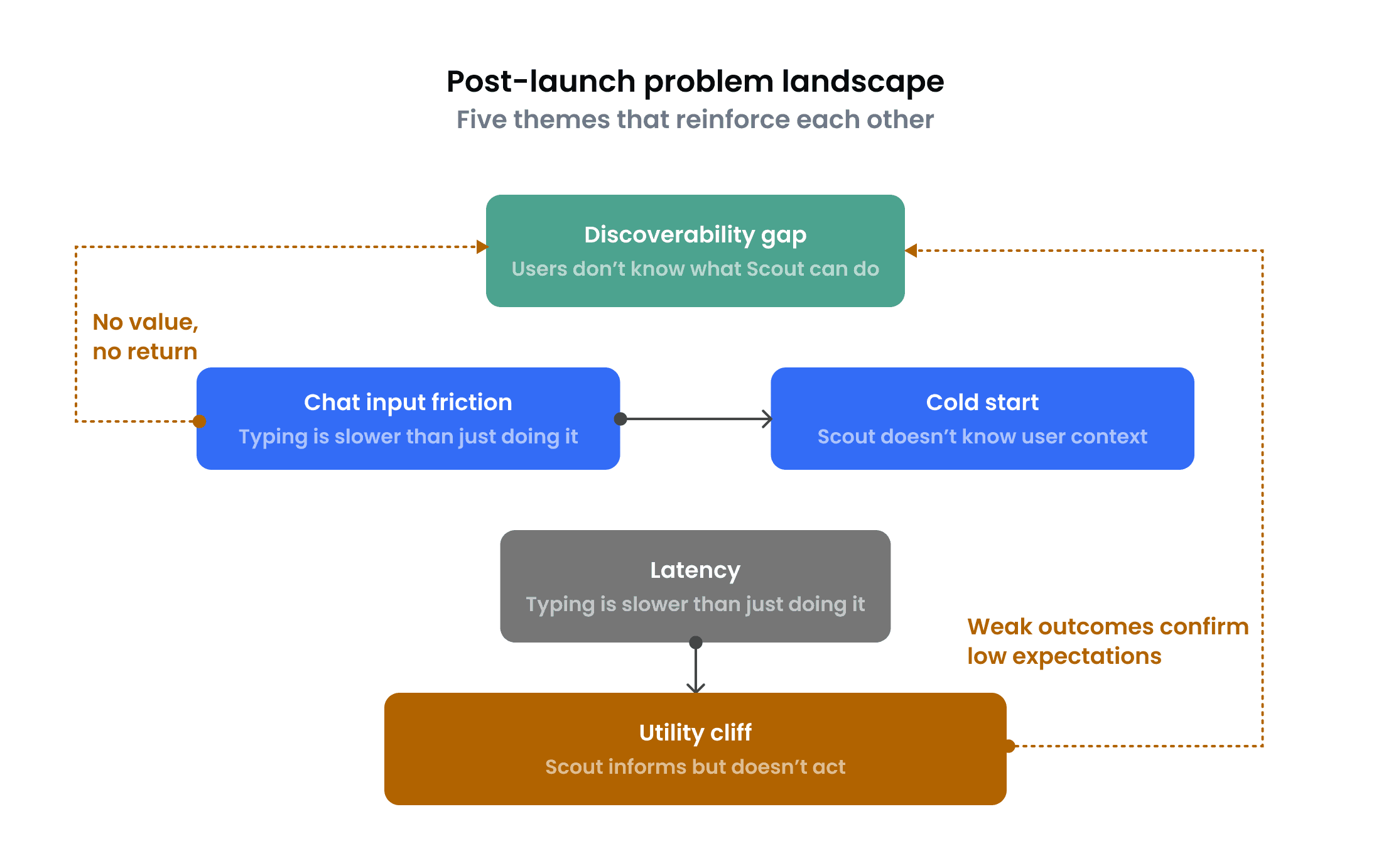
The arrows in this diagram are what made the document valuable beyond a simple list. Discoverability failures pushed employers into the chat friction problem (you can't use a tool you don't understand). Cold start amplified chat friction (you have to type even more when the system doesn't know your context). And when employers finally did push through all of that, they hit the utility cliff, which confirmed their low expectations and made them unlikely to return. One weak link would have been fixable. A reinforcing loop required rethinking the whole interaction model.
I documented this as a problem landscape: a strategic artifact that mapped how these five themes reinforced each other and what the team needed to solve first. That document became the foundation for our FY26 planning. It wasn't a design spec. It was a shared diagnosis that gave the whole team a common vocabulary for what "better" looked like.
As I sat with the research across 20+ rounds of iterative testing, two patterns kept surfacing that cut across all five themes.
First, recruiters didn't know what to ask. A blinking cursor and an open-ended prompt are paralyzing when you don't know what the system can do. Features like deep sourcing and job optimization were powerful, but they were invisible. They were buried behind the assumption that users would discover them through conversation. They didn't. Many users couldn't even parse terms like "outreach summary" in our suggestion prompts, let alone think to request those capabilities on their own.
Second, even when recruiters had a clear goal, typing it out was slower than just doing it. They're managing multiple tools simultaneously. Stopping to compose a natural language query, provide context the system should already have, and wait for a response added overhead rather than removing it.
Both patterns pointed to something deeper than individual usability issues. Chat itself was the bottleneck. Making the chat experience smoother wouldn't address the fundamental dynamic: we were asking employers to do work (discover capabilities, articulate intent, provide context) that the system should be doing for them. The question had to shift from "how do we make chat better?" to "does every interaction need to be a conversation?"
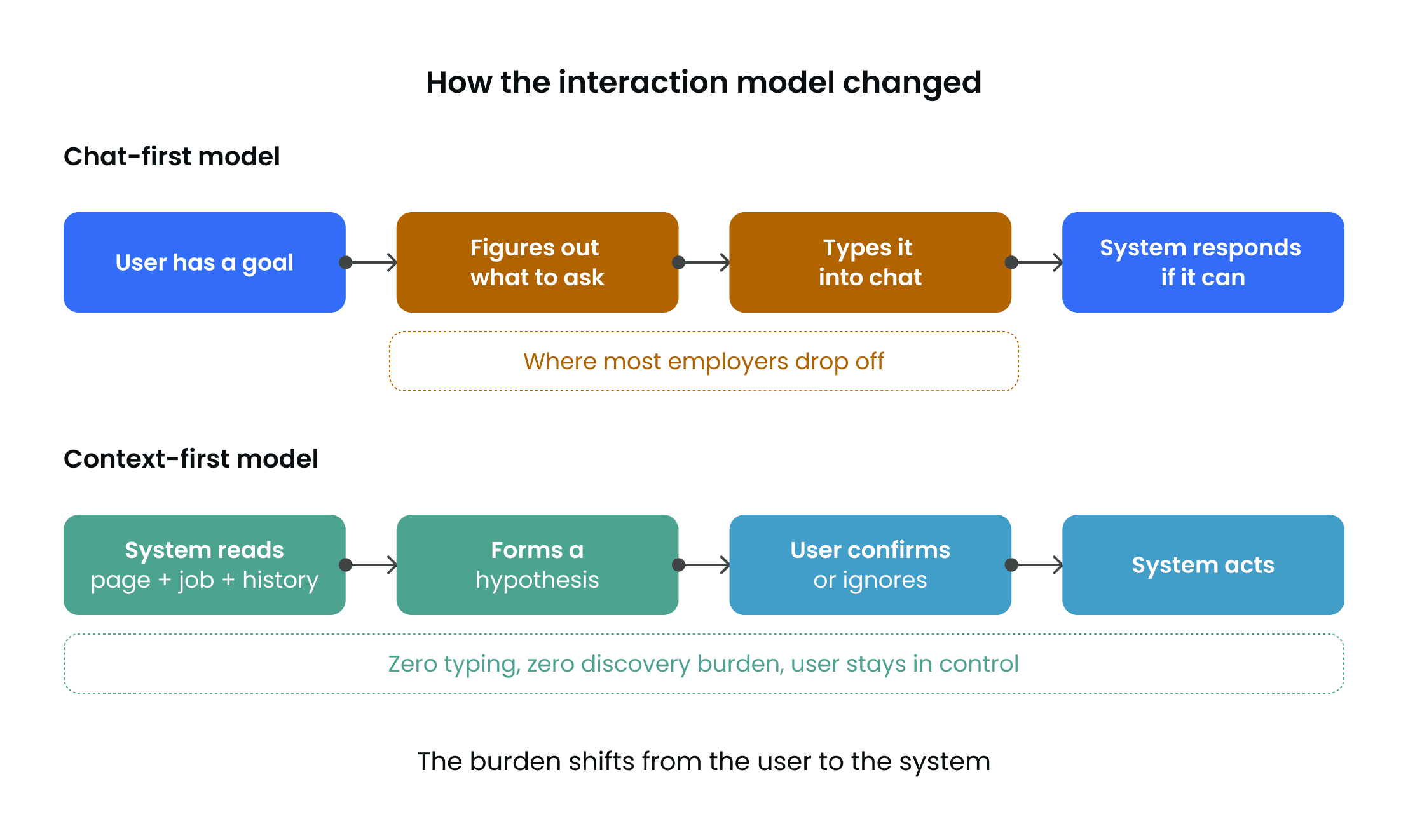
The two red boxes in the top row are where most employers were dropping off. They couldn't figure out what to ask, and even if they could, typing it was slower than just doing the task manually. The bottom row shows the model I proposed: the system reads the context, forms a hypothesis about what the user needs, and the employer either acts on it or doesn't. The burden of initiation moves from the user to the system. The employer stays in control, but the cognitive load of getting started drops to nearly zero.
I designed a three-layer response, each one moving further from chat as the default interface.
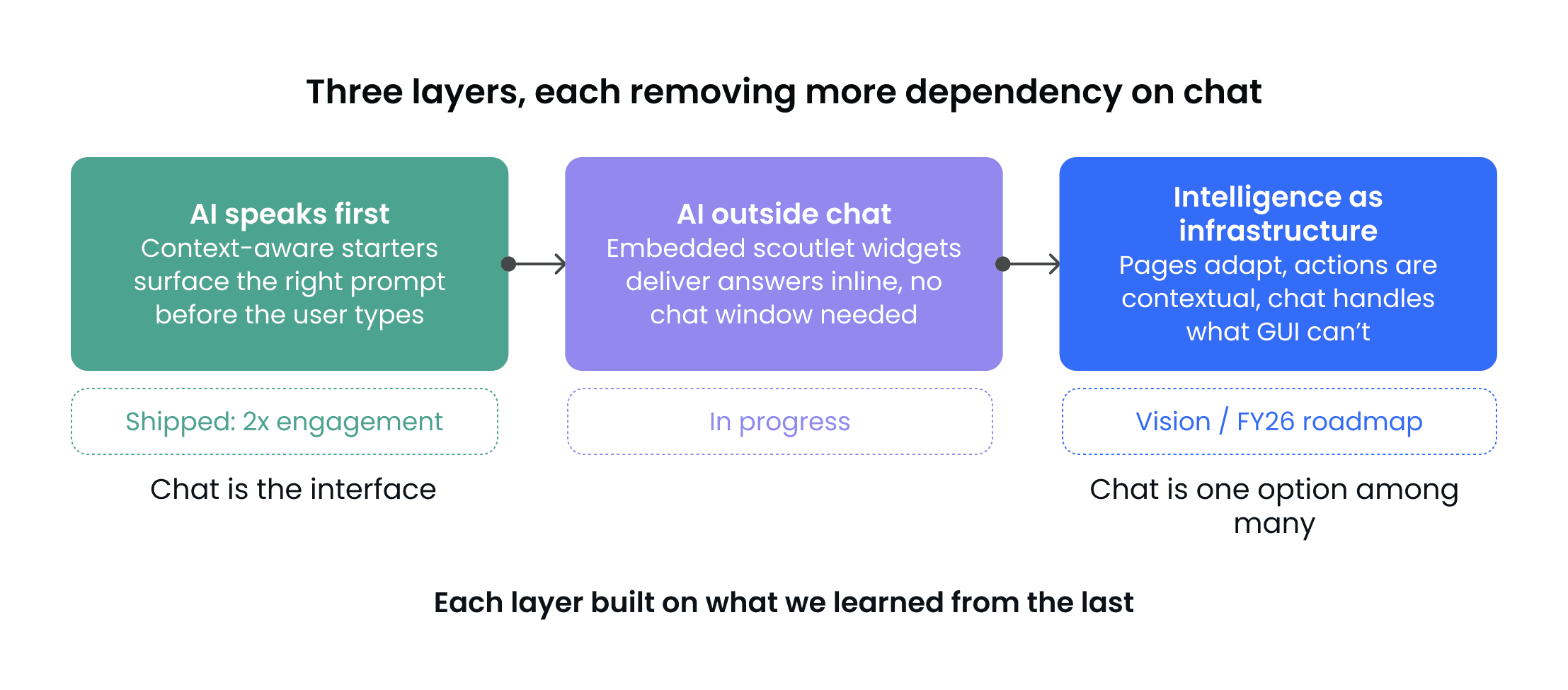
Layer 1: AI speaks first.
Scout reads the context (the job, the market data, the moment) and surfaces a specific, situated prompt before the chat even opens. A recruiter looking at an underperforming job doesn't see a blank input. They see "Why is my job underperforming?" One tap initiates the conversation with intent pre-loaded.
We called these context-aware conversation starters: short, pre-formed prompts generated from live signals like job score, application volume, and market competition. The system forms a hypothesis about what the user needs. The user decides whether to act on it.
Early signals
Context-aware conversation starters delivered 2x the engagement of the previous entry point in initial testing. The scoutlet concept tested strongly in research, with recruiters responding to the inline format as something they'd actually use during their workday rather than setting aside time to explore. And the medium-term vision brief has become the strategic foundation for how the team thinks about the next phase of the product.

Context-aware conversation starter. Instead of a blank chat prompt, Scout surfaces a suggested action based on the page the recruiter is already viewing. One tap initiates the conversation with intent pre-loaded, so the user never has to figure out what to ask or type it out.
Layer 2: AI outside chat entirely.
Layer 1 validated that proactive prompts work. But the recruiter still had to open the chat pane.
I started designing embedded widgets we called scoutlets: AI-powered assistance surfaced directly in the recruiter's workflow. When a job gets flagged for needing sponsorship, an "Ask about sponsorship" widget appears inline on the job list. Pre-set questions expand right there on the page. If they want to go deeper, they can bridge into chat. But the default path requires zero typing and zero context-switching.
An unexpected side effect: recruiters could now see what Scout could do by seeing what it offered to do. The discoverability problem, our top theme in the problem landscape, was effectively bypassed.

Embedded Scout widget. AI-powered assistance surfaced directly in the recruiter's workflow. Clicking expands pre-set questions the user can answer inline without ever opening chat. The AI does the work in the background while the user stays on their page.
Layer 3: Intelligence as infrastructure.
I authored a UX vision brief that asked: if we were building employer.indeed.com today, knowing everything Scout knows, what would we build?
Pages that adapt, pre-sorted by match quality with draft outreach ready to send. Actions that are contextual: "This job received 40 applicants overnight. 6 meet your criteria. Review shortlist." Three clicks, zero typing. Chat handles what GUI can't: complex multi-product instructions, iterative calibration, customer support. But for most employers on most tasks, the page is enough.
I shared this with our Product Director and Engineering leads as a UX brief with design principles, capability patterns, and a phased rollout strategy. That document is now actively shaping our FY26 roadmap.
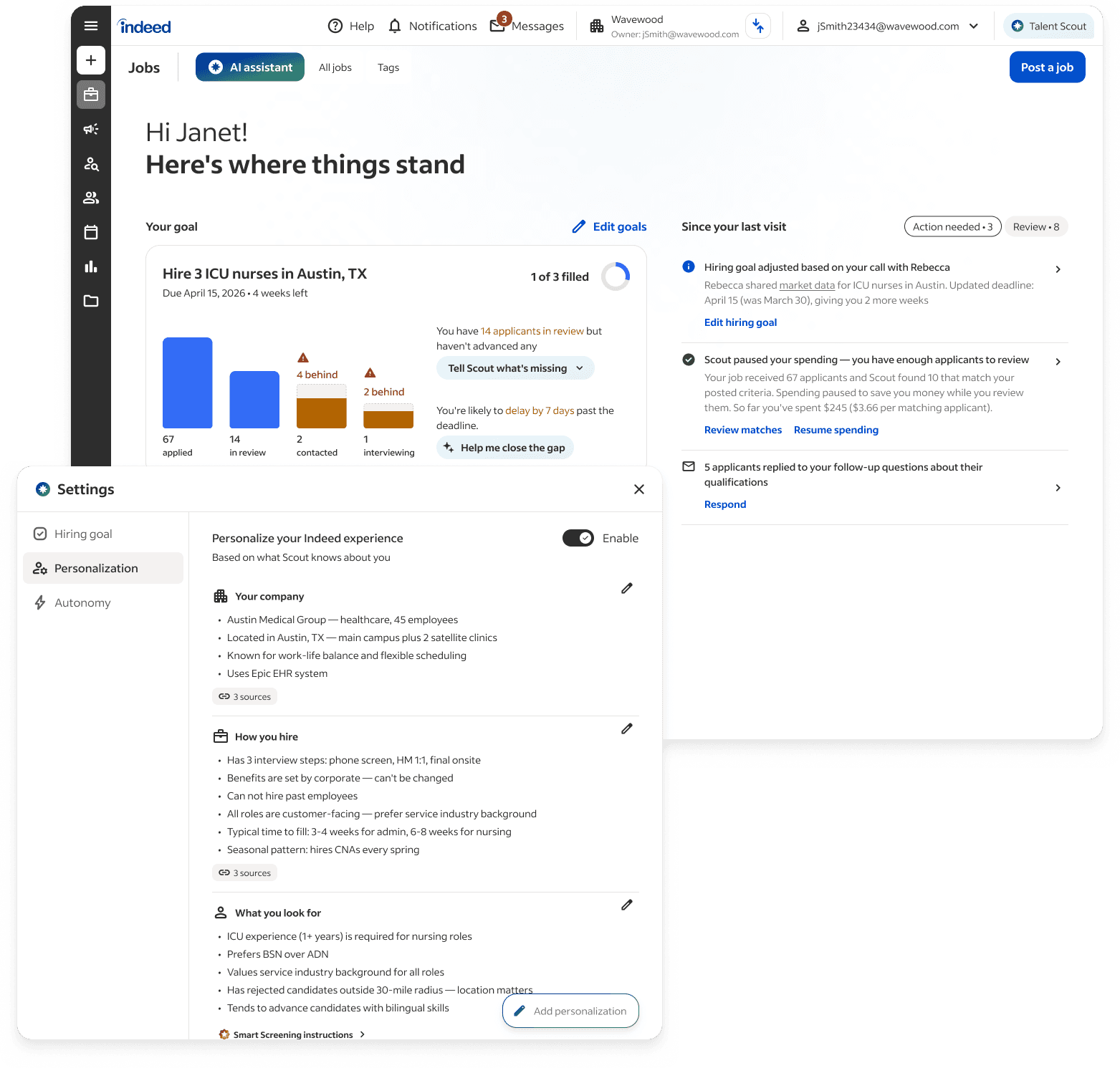
Where we are headed: The page is the interface.
Scout's intelligence shapes what the employer sees before they ask for anything. The dashboard opens with a hiring goal tracker, proactive updates since their last visit, and suggested actions tied to real deadlines. The settings panel underneath shows what Scout has learned about this employer: their company, how they hire, what they look for in candidates. Every future interaction builds on that accumulated knowledge. No chat required to get here.
The throughline across all three layers is the same: intelligence should meet people in the form that fits the task. Sometimes that's a conversation. Often it's a button, a card, a pre-sorted list, or a question that appears at exactly the right moment. Chat still handles what GUI can't. But for most tasks, the page is enough.
05
Impact & Outcomes
Talent Scout launched at FutureWorks 2025. Within four months of limited release, over 1 million US employer accounts had access, with 57% engagement among employers who opened it. Demo observers noted "mouths agape" when seeing Deep Sourcing for the first time. One employer called it "riveting."
Early customers reported measurable hiring gains: a recruitment specialist doubled hiring efficiency to 22.3% conversion (from under 10% before). An HR generalist doubled their candidate pool from 5-7 up to 10-15 applicants for hard-to-fill roles. A clinical recruiter made 10 hires while saving 8 hours weekly, noting it took just "5 seconds to type one prompt" to get 30+ quality candidates.
Solving these is what turns Scout from a tool employers use occasionally into a system that gets smarter the more they use it, the same compounding intelligence principle that made match criteria work, but applied to the entire product experience.
We started with a marketplace trust gap (97% AI adoption, low trust for high-stakes tasks) and every design decision flowed from that constraint. The calibration pivot taught me that intellectual honesty about what isn't working is more valuable than polishing what is. The progressive disclosure pattern for analytics taught me that trust is sequential, and you can't skip steps. And the three-layer evolution away from chat taught me that the best interaction model is the one that disappears, not the one that's most technically impressive.
If I could go back, I'd build measurement infrastructure from day one. We designed the right product strategy for match criteria but didn't have the attribution model to prove it cleanly. I'd also push harder on the "AI outside chat" direction earlier. The research signaled it from the beginning, but we needed to ship Layer 1 before the organization was ready to hear that chat wasn't enough.
The single biggest lesson from building an AI product from zero to launch: the hardest design problems aren't about the AI. They're about earning the right to use it.
OTHER CASE STUDIES