01
Background
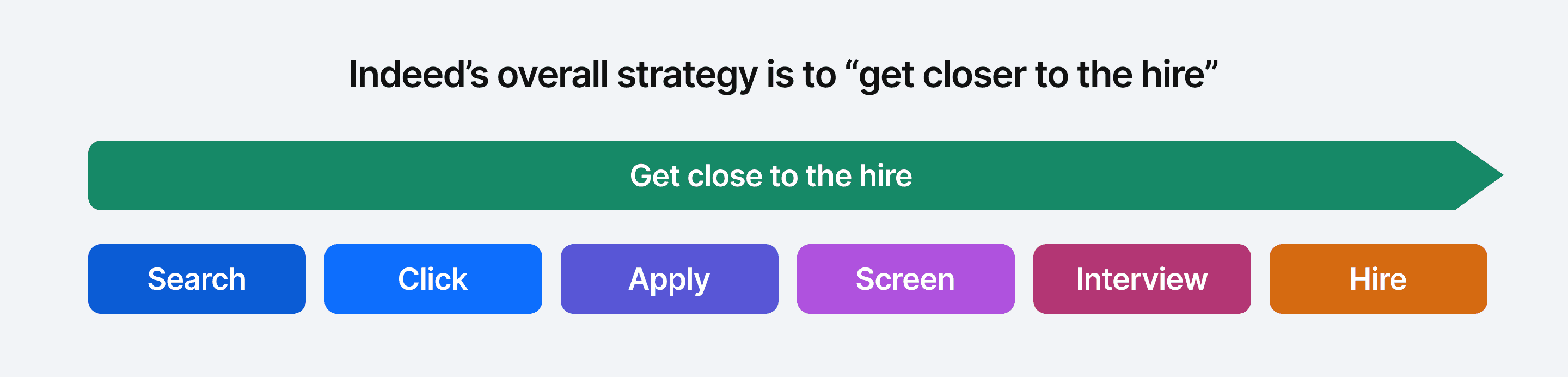
Indeed’s mission is to help people get jobs as easy and fast as possible. However, job seekers don’t hear back after submitting an application (“The black hole problem”). The average employer has to juggle 16+ tools in their hiring process. There is a ton of manual work, delays, and cost to move candidates between steps in the hiring process.
To address these pain points and drive revenue growth, Indeed's VP of Product wanted to scale hiring automation across the marketplace.
The brief
My role
02
Framing the problem
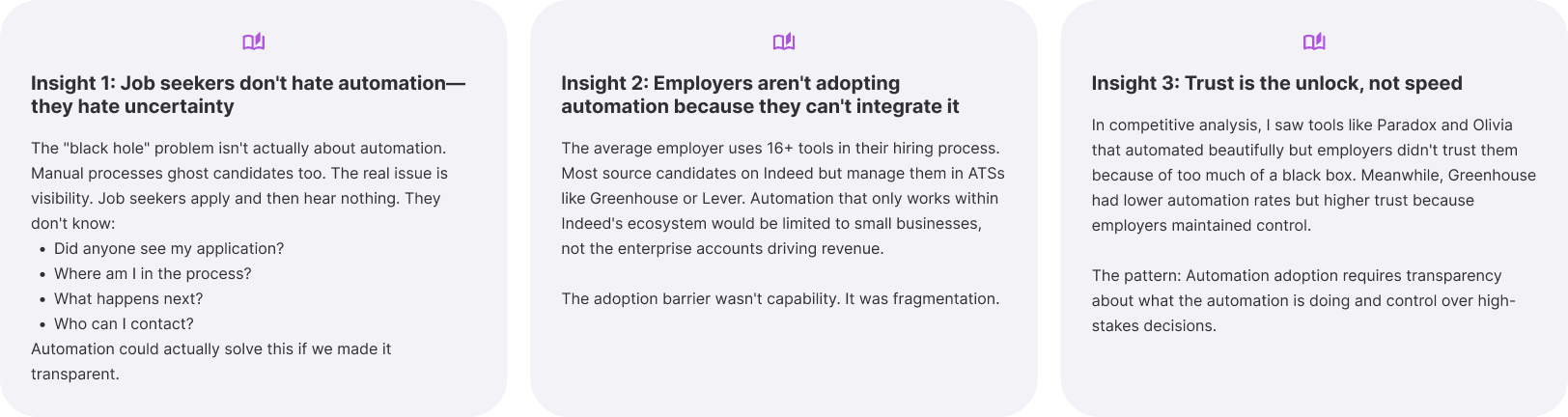
I started with desktop research across 200+ employer studies in Indeed's research library and competitive analysis of automation platforms. Three insights emerged that challenged the initial framing:
The strategic reframe
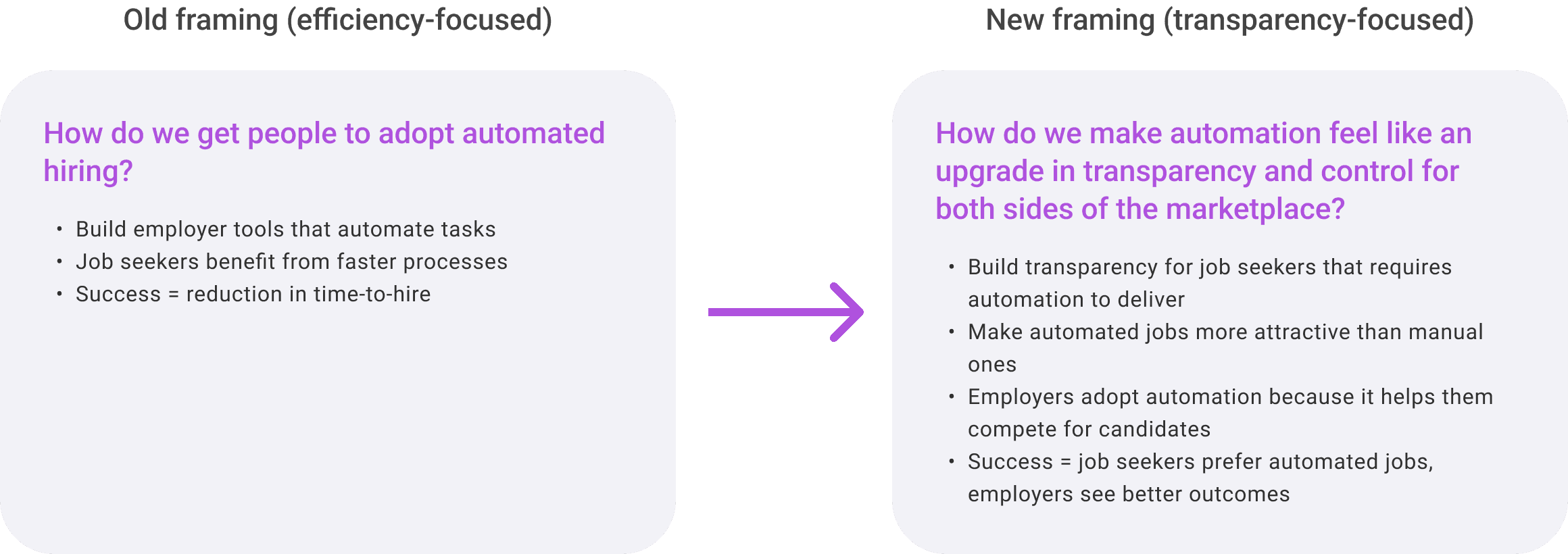
The reframe turned automation from an employer efficiency feature into a two-sided marketplace value proposition. If we designed job seeker transparency so compelling that candidates preferred automated jobs, employer adoption would follow—not because we convinced them to change processes, but because it became a competitive advantage.
03
The Design Strategy
Why I started with job seekers
Most automation visions start employer-side because that's where the revenue is. I flipped the sequence. If job seekers won't engage with automated jobs, employers won't adopt automation. We needed to design an experience so compelling that job seekers would prefer "FastTrack" jobs.
This wasn't just user-centricity—it was business strategy. The job seeker experience became the north star that employer tools needed to enable.
Design execution & timeline
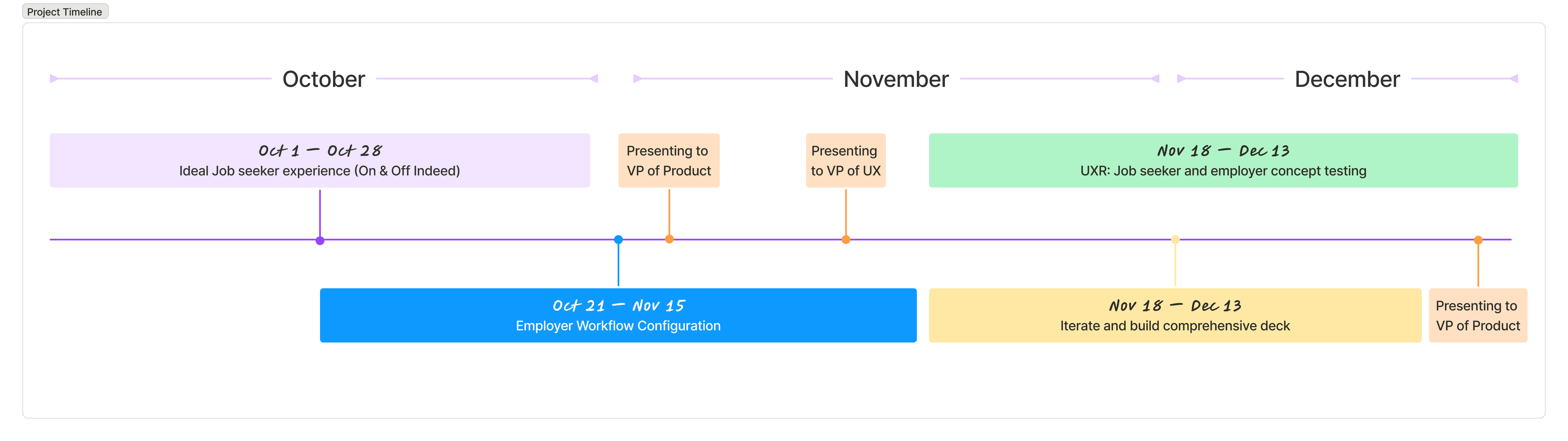
Month 1 (Oct): Establish the north star:
Started with desktop research across 200+ UXR studies and competitive analysis (vs. 6-8 weeks of new primary research)
Designed job seeker experience first to set the bar for what employer tools needed to enable
Focused on experience principles over pixel-perfect screens
Month 2 (Nov): Solve the hardest problems:
Employer workflow design concentrated on strategic questions: portability, flexibility vs. simplicity, ROI measurement
Weekly partnership with PM and Engineering to reality-check feasibility
Created artifacts that drive fast alignment: journey maps and decision frameworks, not comprehensive design systems
Month 3 (Dec): Validate and prioritize
UXR tested assumptions that could derail roadmap ("Will employers trust agent-created workflows?")
Final deliverable: "Here's what to build first, second, third—and why"
Three design principles that shaped the solution
Transparency as the product
Don't just automate hiring stages; make every stage visible. Job seekers don't hate automation—they hate uncertainty. Every automated action needed to answer: "What just happened? What's next? Who can I contact?"
Automation ≠ Loss of control
Give both sides agency. Job seekers get direct messaging and clear next steps, not just status updates. Employers get human-in-the-loop at high-stakes moments, not black-box AI decisions.
Portability over platform lock-in Build for Indeed AND third-party ATSs.
Most employers source on Indeed but manage candidates elsewhere. If automation only worked in our walls, we'd lose enterprise adoption. The system needed to be connective infrastructure, not another silo.
04
Design Concepts
Job Seeker-Side Design Concepts
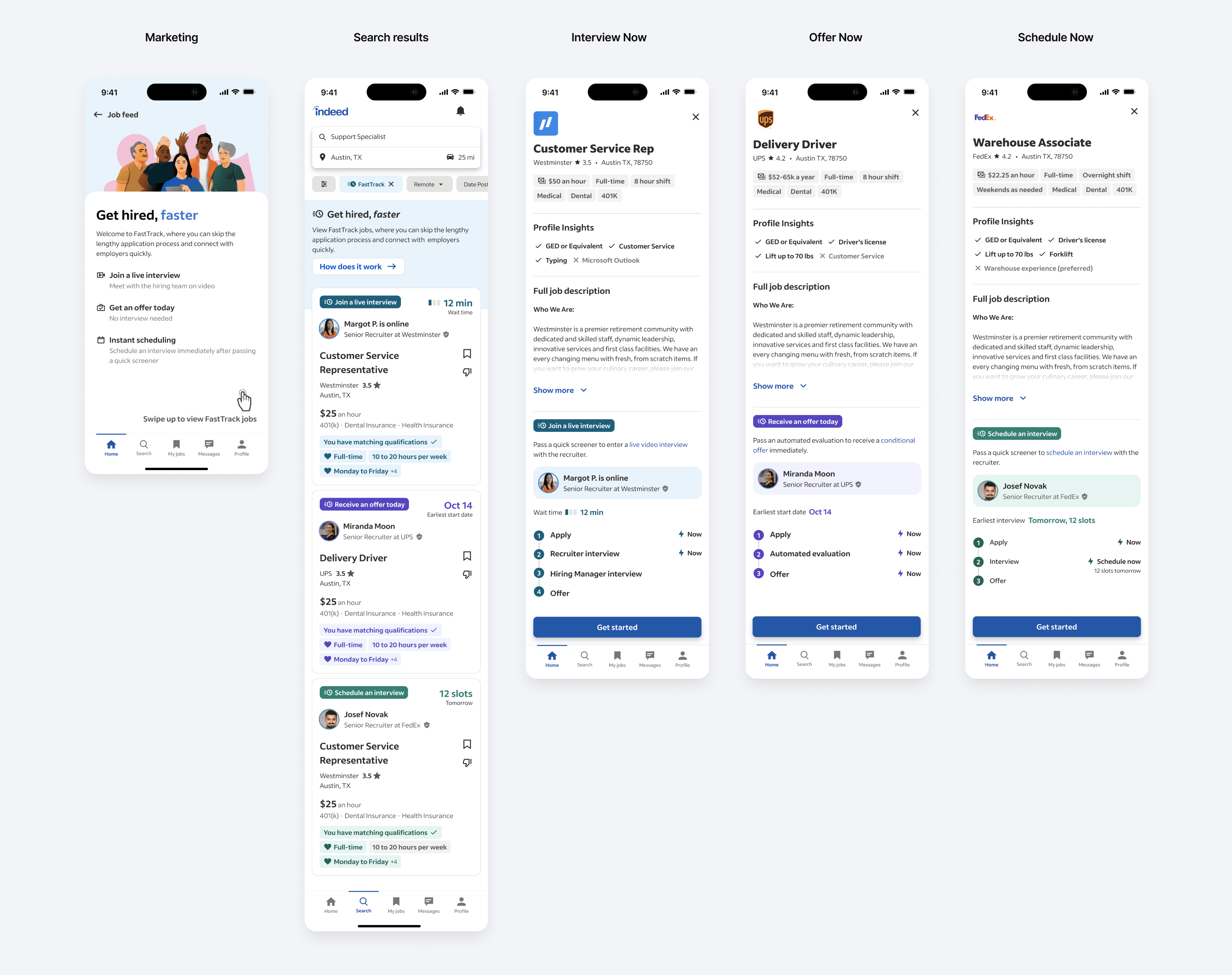
Concept 1: Created "FastTrack" as a category, not a feature
Job seekers needed to recognize automated jobs as better, not just different. I positioned automation as a premium tier—the jobs where employers are serious and responsive.
Trade-off: Required marketing investment and category education, but turned a potential negative (automation = impersonal) into a positive (automation = transparency).
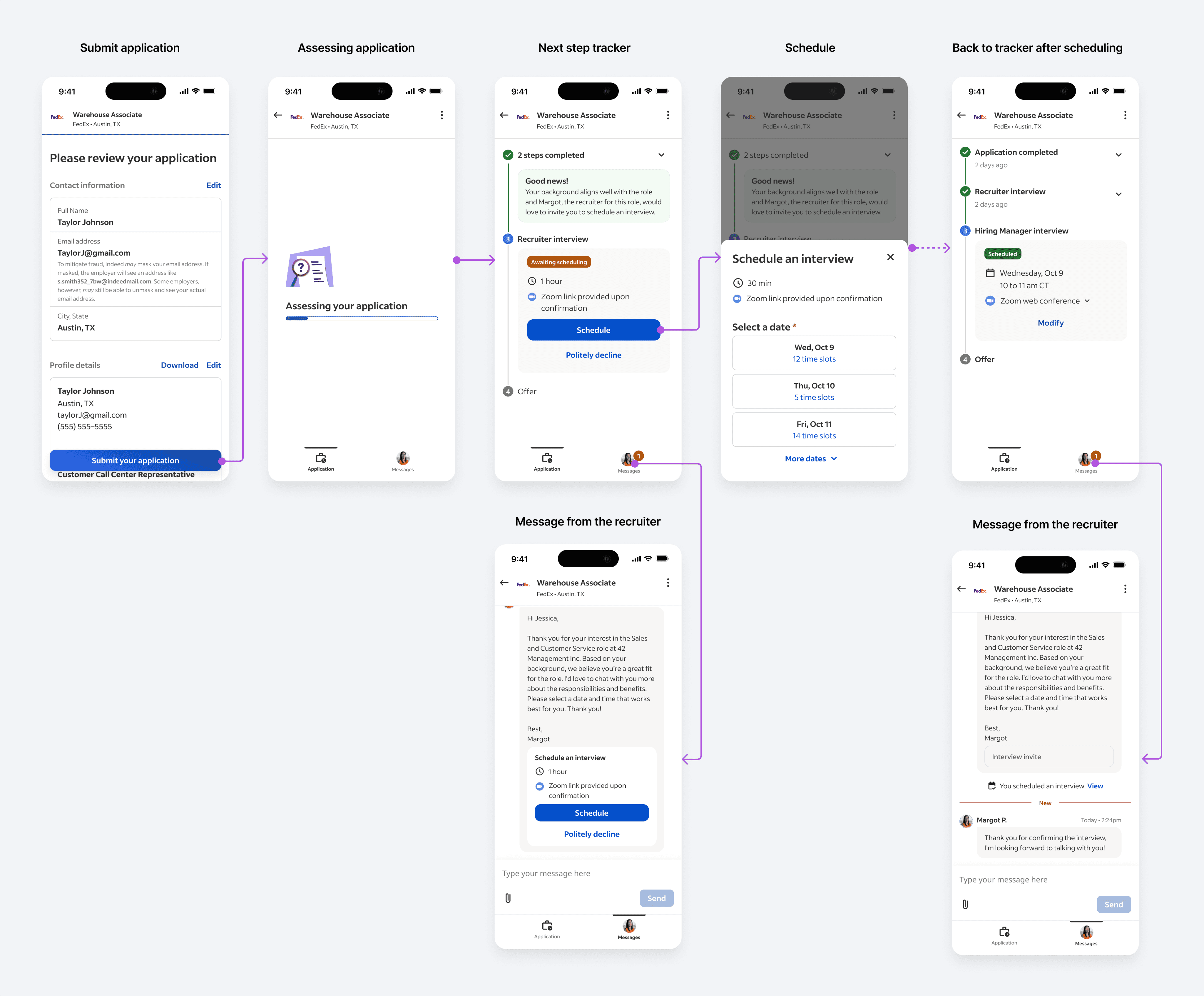
Concept 2: Dedicated application view vs. embedding in existing tracker
The existing tracker was built for passive waiting. Automation requires active engagement—direct messaging, clear next steps, real-time updates.
What I rejected: "Smart notifications" that alert job seekers when something changes. This creates dependency without empowerment. Instead, I gave job seekers a control hub where they can see status and initiate contact.
Employer-Side: Navigating Workflow Complexity
This is where the design challenge became exponentially harder. Employers weren't asking for automation—they were drowning in tool fragmentation across 16+ hiring platforms. The workflow system needed to work across Indeed's ecosystem AND their existing infrastructure.
The core tension I had to resolve:
Small employers: "Just give me a button"
Enterprise recruiters: "I need custom rules for 47 job types"
I needed a system that felt simple for first-time users but could scale to enterprise complexity.
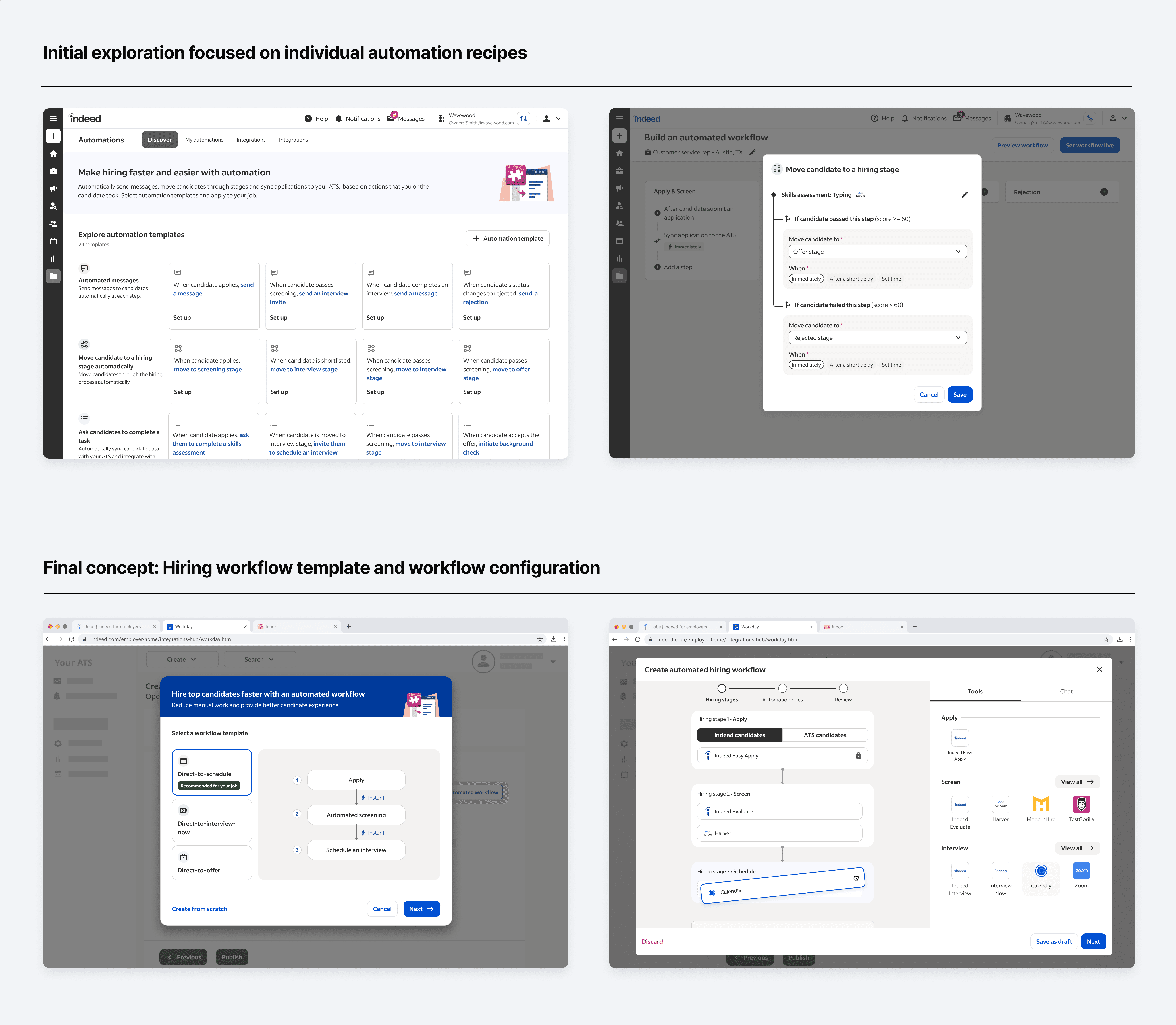
Concept 3: Templates + customization (balancing simplicity and control)
My competitive analysis revealed a pattern: Tools with "smart defaults" had higher adoption than blank-slate builders. But template-only tools hit a ceiling with enterprise users who needed flexibility.
What I designed:
Templates as the default path—pre-built Direct-to-Schedule, Direct-to-Interview, Direct-to-Offer workflows based on Indeed's hiring data. One-click activation for the 80% who want "just make it work."
Progressive disclosure for the 20% with complex needs—drag-and-drop stage builders, conditional logic ("If candidate has 3+ years experience, skip phone screen"), and integration hooks for tools like Calendly or HireVue.
What I rejected: Wizard-based setup that walks employers through every decision. Testing showed 60%+ abandonment—analysis paralysis. Templates with optional customization had 3x completion rates.
The strategic bet: Make the simple path effortless while keeping the complex path possible.
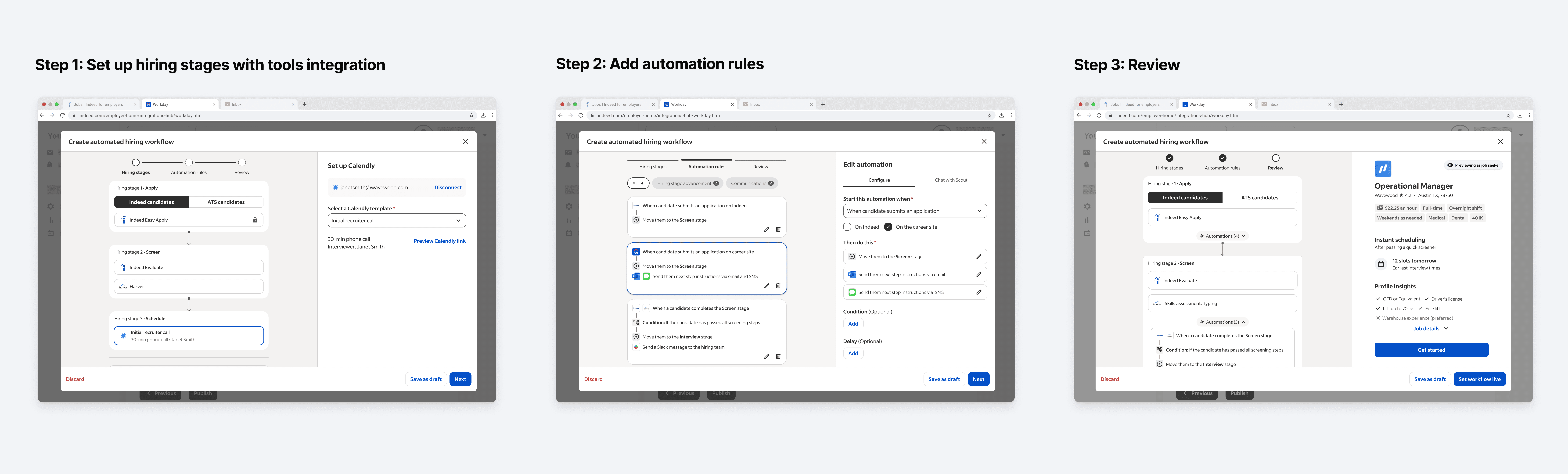
Concept 4: Multi-tool portability (Indeed + ATS compatibility)
Most employers source on Indeed but manage candidates in ATSs like Greenhouse or Lever. If automation only worked within Indeed, we'd lose enterprise accounts—the revenue drivers.
What I designed: A universal candidate format that works whether candidates live in Indeed or the ATS, with portable automation rules and two-way sync so job seekers see progress regardless of where employers manage them.
The trade-off: Required partnership with platform teams and extended engineering timeline. I made the case using competitive data—Greenhouse's automation succeeded because it worked with existing tools. We needed to be connective infrastructure, not another silo to manage.
Engineering pushed back. Timeline and integration complexity were real concerns. My response: Phase this. ATS portability becomes Phase 2, not MVP. This preserved the strategic vision while acknowledging engineering reality.
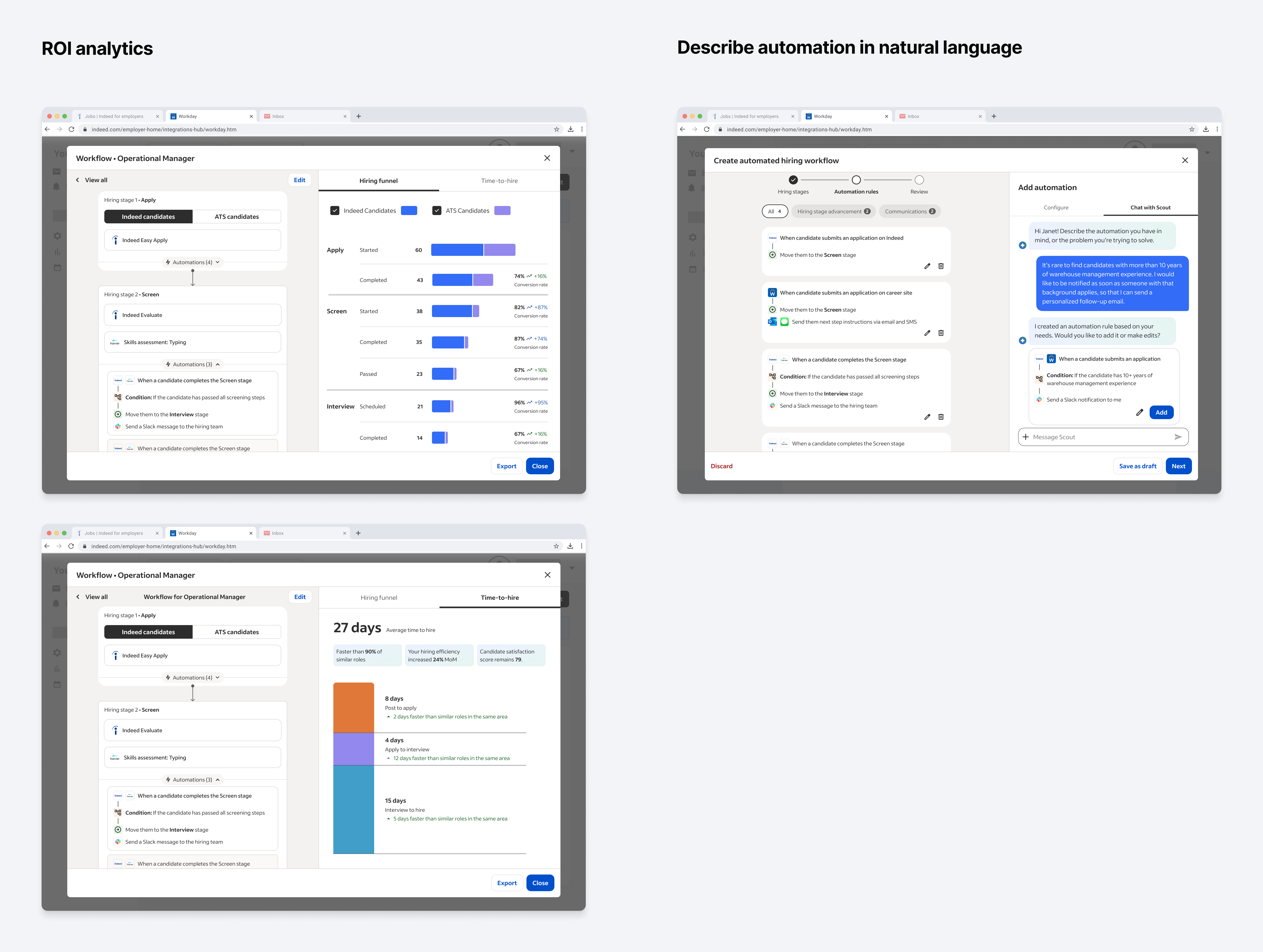
Concept 5: Contextual analytics (proving ROI)
Employers wouldn't adopt automation without proof it works better than manual screening. "I don't know if this is worth it" was the adoption blocker.
What I designed: Analytics embedded directly into the workflow builder. When you're setting up automation, you see predicted outcomes based on Indeed's data: "Automated workflows: 12 days to hire vs. Manual: 28 days." After launch, you see actual performance—conversion rates, show rates, cost per hire—right where you manage candidates.
Design rationale: Following Greenhouse's pattern of embedded analytics (vs. Lever's retrospective-only reports), but amplified with Indeed's massive cross-platform hiring data for more accurate predictions. This turned automation from "experimental feature" to "measurable business decision"—critical for enterprise procurement buy-in.
Concept 6: Agent-augmented workflow creation (natural language rules)
Even with templates and drag-and-drop, employers struggled with IF/THEN logic. "IF candidate scores 8+ on assessment AND has 3+ years experience THEN skip to final interview" is conceptually simple but technically intimidating for non-technical recruiters.
What I designed: Natural language rule creation where employers type intent—"Only send high-rated candidates to my hiring manager"—and the agent translates to executable logic. Employers review and confirm (human-in-the-loop) before activation.
Strategic rationale: If only engineers can build workflows, adoption stalls. Natural language democratizes automation.
Smart escalation: Based on UXR, I identified high-stakes moments where employers needed control—final offers, compensation negotiations, handling role changes. The agent automates 80% but explicitly flags: "This decision requires your review."
05
Impact & Outcomes
Immediate impact (Dec 2024)
Vision work directly shaped Advanced Screening feature set for Q1-Q2 2025 launch, including feature sets from the vision work: Direct-to-X automation, ATS integration, workflow templates, workflow builder and analytics dashboard prioritized for roadmap. Agent-augmented rules is slated for future roadmap.
What I learned
Vision work is only valuable if it drives decisions. The 3-month constraint forced me to think like an executive, not just a designer. Every design decision needed a clear "why this matters for roadmap" rationale. Every concept needed a "what do we build first" perspective.
The biggest impact came from reframing automation as a transparency problem—this made it a job seeker value prop, not just an employer efficiency play. That reframe unlocked budget, roadmap priority, and cross-functional commitment. But equally important was designing in phases that mapped to business reality: MVP for proving value, Phase 2 for scaling adoption, Future vision for competitive differentiation.
Tight timelines clarify strategic thinking. When you can't design everything, you're forced to design what matters most. That discipline made the work stronger.